


Assigning an employer to an employee
Do you host external employees? Posted workers? Subcontractors? Do you manage multiple sites within your company?
If the employer is not the one identified on the sub-account, you can assign an external employer to each wearer individually.
Learn how to proceed.
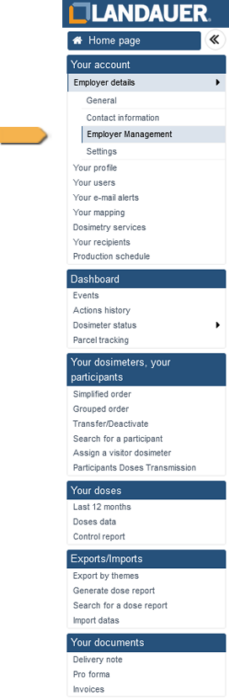
- Go to the “Your account / Employer details / Employer Management” menu on the left side of your screen.
At the first login, you will only see the default employer, meaning the employer linked to the account.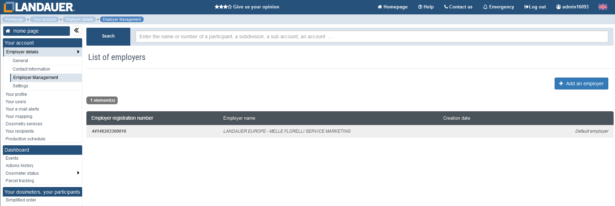
- Click on “Add an employer” at the top right of the screen.
- In the window that opens, enter the employer identification number to be created (SIRET, APE, …) and its name.
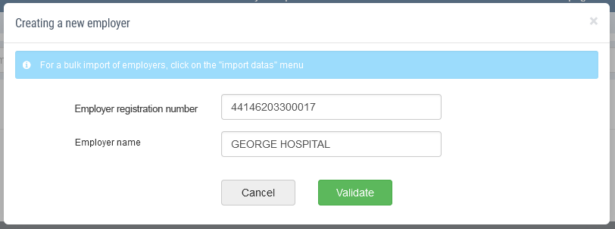
Please note, any employer created cannot be deleted. However, you can modify the information by clicking on the  icon to the right of the relevant line.
We encourage you to pay particular attention to entering the identification number, as it allows the transfer of doses to national registers (SISERI, FANC, …), subject to data matching between LANDAUER and the register. - Click on “Validate”.
- Go to the record of the participant whose employer you want to change.
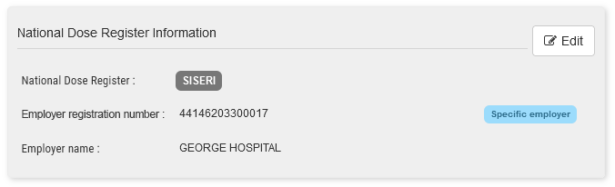
- In the top right of your screen, a gray block shows the national dose register to which the holder is attached (SISERI in France, FANC in Belgium, …) and the national identifier of their employer (SIRET in France, BCE in Belgium, …).
If the employer’s national identifier is incorrect, you can correct it directly on LANDAUER Direct.
If the worker appears as unclassified but should be classified, please contact our Customer Service.The tag “default employer” will appear if this employer is the same as the account
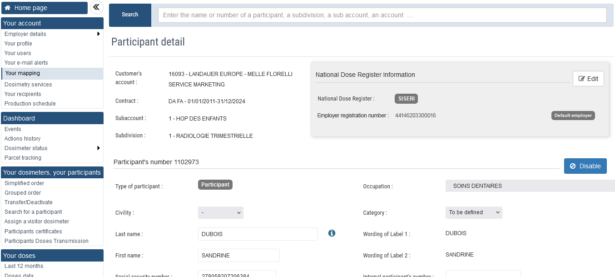
- Click on “Edit” at the top right of the block to select another employer previously created.
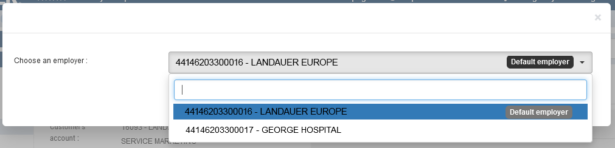
- Click on “Validate”.
- The mention “Specific employer” appears in blue to the right of the grey block.
Do you want to create multiple specific employers?
LANDAUER Direct includes a feature designed to help you.Datas import
Assigning a different employer to an employee has no impact on billing. The dosimeters for these wearers will still be billed to the account managing them.
There is also no impact on the recipients of results or control reports.