Create a participant
Do you need to set up dosimetric monitoring for a new arrival?
To create its profile, select the subdivision to which you will assign it.
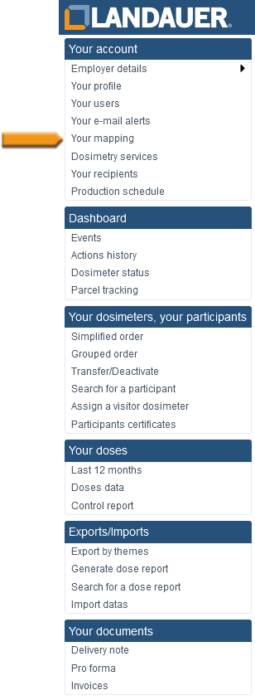
- Go to the menu on the left of your screen and select “Your mapping“.
- Click on the subdivision to which to attach the new carrier
- At the top of the list of carriers appear the following buttons:
– Add area monitoring
– Add a visitor
– Add a participant
Click on “Add a participant“ - Enter all or part of the participant’s name.
- Click on “Click here to add a new participant” below the list of suggestions
- Fill in the fields (mandatory fields are indicated by an *)
- Save with the “Validate” button . The participant’s summary appears
- Click on the “Add service” button at the bottom right of the new window
- Select the required service(s) in the “Service” column by ticking each box
- Set the date for beginning of the wear period. If the other dosimeters of the wear period are already manufactured, then “Express shipment” is indicated
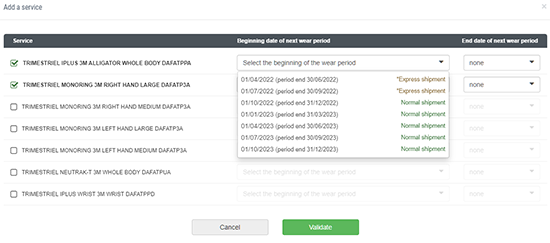
- If you know the end date for this dosimetry service, fill in the field in the “End of date of next wear period” column
- Click on “Validate” button